

Firmware Repair in Enterprise Hard Drives
Enterprise-level hard drives, such as those from Dell and Toshiba, are integral to the operations of large organizations and data centers. Their robustness ensures longevity, high performance, and data security. However, despite their reliability, firmware corruption remains a formidable challenge that can compromise data integrity and system stability. When firmware issues strike, professional intervention becomes essential.
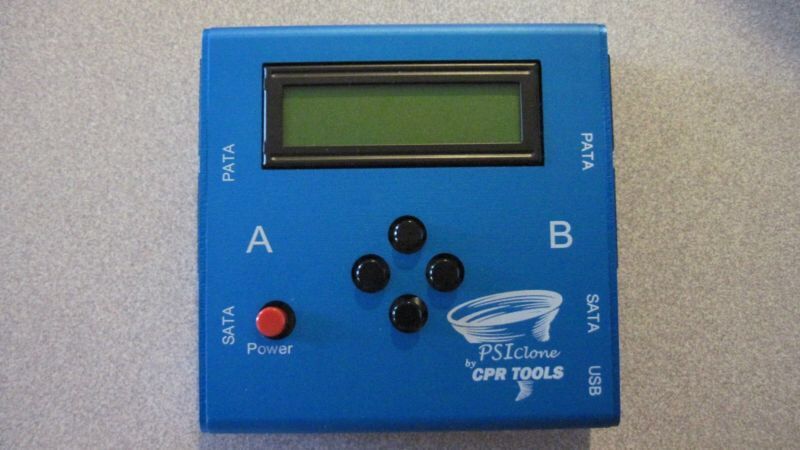
Seattle Data Recovery specializes in enterprise hard drive data recovery and firmware repair, utilizing advanced tools like PSIClone and CPR Flash to restore drives to operational status. These tools allow technicians to re-flash and repair firmware on Dell and Toshiba enterprise hard drives, minimizing downtime and maximizing data recovery prospects.
The Critical Role of Firmware in Enterprise Hard Drives
Firmware functions as the foundational software embedded within a hard drive, controlling the device's firmware operations, such as data reading, writing, and error correction mechanisms. In enterprise hard drives, especially those from Dell and Toshiba, firmware ensures that the drive operates efficiently within complex data infrastructures. When firmware becomes corrupted, core functionalities are compromised, leading to a variety of symptoms that impair drive performance.
Firmware corruption can occur due to multiple reasons — including power fluctuations, failed updates, or physical damage. Once firmware integrity is compromised, the drive may become undetectable, exhibit slow performance, or produce unusual noises. Such issues necessitate precise diagnostics followed by targeted firmware repair, an area where Seattle Data Recovery excels with its state-of-the-art equipment and expertise.
Identifying the Symptoms of Firmware Corruption
Firmware issues in Dell and Toshiba enterprise hard drives often manifest in several tangible ways. System detection problems are among the earliest signs; the BIOS may fail to recognize the drive altogether, displaying errors like "No boot device found." Additionally, an incorrect display of drive capacity or model number signals probable firmware corruption.
Other physical and audible symptoms include clicking or grinding sounds, which could suggest mechanical issues stemming from firmware-related errors. Performance degradation is also notable—slow access times, frequent system freezes, or intermittent spin-up and spin-down cycles are classic indicators of firmware failure. Recognizing these symptoms early enables timely intervention and minimizes the risk of data loss.
The Impact of Firmware Corruption on Data Integrity
The consequences of firmware corruption extend beyond mere operational hiccups. As the firmware governs essential drive functions, its failure can lead to severe data integrity issues. Files become unreadable, data may be corrupted, and in some cases, the entire drive may become inaccessible.
In enterprise environments where data is critical, such corruption can lead to operational delays, financial losses, and productivity setbacks. Moreover, the inability to access data during critical times emphasizes the need for reliable firmware repair solutions. Seattle Data Recovery employs precise solutions, including the use of PSIClone and CPR Flash, to repair firmware, thereby restoring data accessibility and drive stability.
Common Causes Behind Firmware Corruption
Understanding what causes firmware corruption is crucial for preventing and effectively recovering from it. Power fluctuations pose a significant threat; unexpected outages or surges can interrupt firmware updates, leading to corrupt data sectors. Similarly, incomplete firmware updates resulting from improper shutdowns during the process often lead to a compromised firmware state.
Physical damage is another common culprit—shocks, water exposure, or high-temperature environments can physically damage internal components, affecting firmware integrity. Additionally, malware or malicious software may intentionally or unintentionally damage firmware sectors, undermining drive functionality. Recognizing these causes enables the implementation of better preventive measures and tailored recovery tactics.
Seattle Data Recovery's Approach to Firmware Repair
When firmware corruption occurs, Seattle Data Recovery adopts a systematic approach to address the issue. First, comprehensive diagnostics identify the extent of the corruption and physical or logical damages present. Armed with this information, our technicians then utilize specialized tools, such as PSIClone and CPR Flash, to perform precise firmware repairs on Dell and Toshiba enterprise hard drives.
The use of the PSIClone allows us to clone and analyze the drive's firmware in detail, creating a reliable backup of intact firmware segments. Following this, CPR Flash serves as a utility tool designed to flash or reprogram the drive's firmware efficiently. This process restores the drive to a functional state, often without requiring the replacement of physical components, thereby saving time and reducing costs.
The Power of CPR Flash in Firmware Restoration
CPR Flash, developed by CPR Tools, is a vital utility for updating or flashing firmware on various CPR device models, including PSIClone, Hammer, and SCSI Hammer. Its primary function is to update or re-flash firmware, ensuring the device's firmware remains current, compatible, and operational.
Installing CPR Flash™ is straightforward, as it's integrated into the CPR Tools Utilities Suite, shipped with every CPR Tools device. Once installed, users can initiate firmware updates, which are displayed through an intuitive interface that guides them step-by-step. During firmware flashing, only one device should be connected via USB to ensure safe operation; therefore, meticulous handling is essential during the update process.
How CPR Flash™ Facilitates Effective Firmware Updates
Updating firmware with CPR Flash™ is a precise operation that involves connecting the CPR Tools' device — such as PSIClone or Hammer — to the host PC and running the utility. During this process, the software communicates with the device, overwriting or replacing the existing firmware with a compatible version.
At Seattle Data Recovery, we utilize CPR Flash to ensure drives, particularly Dell and Toshiba enterprise hard drives, receive even more reliable firmware updates. Proper updates can resolve existing firmware bugs, improve compatibility, and enhance overall drive stability. When used correctly, CPR Flash™ can prevent future firmware corruption, thereby safeguarding data and minimizing downtime.
Best Practices for Firmware Management and Prevention
While tools like PSIClone and CPR Flash empower technicians to perform firmware repairs successfully, prevention remains the best strategy. Regularly updating firmware from trusted sources, avoiding abrupt shutdowns during firmware updates, and ensuring a consistent power supply are all key steps. Using UPS systems mitigates risks associated with power fluctuations, thereby reducing the likelihood of firmware corruption.
Additionally, routine diagnostics and hardware health checks can identify early signs of potential firmware issues. These proactive steps allow organizations to address potential threats before they escalate into significant problems. Implementing rigorous firmware management routines preserves the integrity of Dell Toshiba enterprise hard drives and prolongs their operational lifespan.
When to Seek Professional Firmware Recovery Services
Despite preventative efforts, firmware corruption can still occur and often requires specialized intervention. At Seattle Data Recovery, we recommend consulting professionals when early signs of firmware issues appear, especially in enterprise environments where data integrity is crucial. Attempting DIY repairs can sometimes worsen the problem, and improper flashing may lead to irreversible damage.
Professional data recovery services often involve carefully analyzing the corrupted drive, cloning the firmware, and re-flashing with tools like PSIClone and CPR Flash. These services are designed not only to repair the firmware but also to recover vital data that might otherwise be lost. Entrusting your Dell Toshiba enterprise hard drive to experienced technicians ensures the highest chances of successful recovery and drive restoration.
Final Thoughts: Securing Your Data with Expert Firmware Repair
Firmware issues in Dell and Toshiba enterprise hard drives are complex but manageable with advanced tools and expert knowledge. Seattle Data Recovery stands at the forefront of professional firmware repair, utilizing the power of PSIClone, CPR Flash, and other cutting-edge tools to restore drive stability and data integrity. Whether you're facing symptoms of firmware corruption or planning preventative maintenance, understanding the vital role of firmware management is essential.
By embracing proactive diagnostics, strict firmware management routines, and engaging in professional repair services at the first sign of trouble, organizations can safeguard their critical data assets. Remember, in the realm of enterprise hard drives, expertise and precision are essential to successful recovery and long-term operational health.
Successfully managing and repairing firmware on Dell Toshiba enterprise hard drives requires a combination of sophisticated tools and professional expertise. Seattle Data Recovery excels in this field, ensuring your data stays secure and your systems remain operational. Whether it's through the deployment of PSIClone, the strategic use of CPR Flash, or comprehensive diagnostics, effective firmware repair can significantly reduce downtime, mitigate data loss, and extend the life of your valuable storage assets. Trust us to keep your enterprise storage solutions running smoothly with proven, reliable firmware repair methods.








