

Pricing

Our Honest Approach to Data Recovery Diagnostics and Pricing
What Your Diagnostics Fee Covers
-
Investigative Engineering Labor: A senior data recovery engineer personally isolates your drive under a microscope or connects it to advanced hardware emulators to read your system's raw microcode tables.
-
Specialized Hardware Costs: We utilize industry-leading diagnostic stacks, micro-soldering gear, and hardware write-blockers that safely interact with failing media without modifying your original files.
Guiding Your Final Price: Our "No Data, No Cost" Guarantee
- Details
- Written by: Seattle Data Recovery
- Category: Pricing
At Seattle Data Recovery, we handle every case with military-grade precision and strict chain-of-custody protocols. From the moment you hand over your device to the final delivery of your recovered files, our award-winning process is designed to be secure, transparent, and highly effective.
1. Secure Device Drop-Off
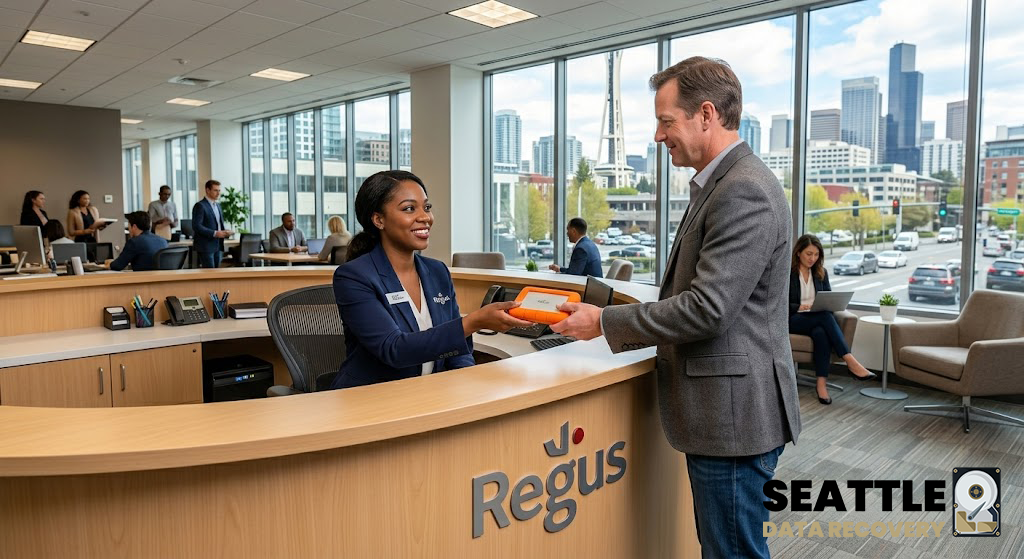
Your data recovery journey begins at our main office, conveniently located within the UW Medicine building in Ballard. Bring your damaged drive to our reception desk, where our staff will securely log it and receive it.
2. Initial Diagnosis & Authorization
Transparency is our priority. Before any work begins, you will receive an invoice for the initial diagnosis that clearly outlines our complete terms of service. Once this invoice is paid, your device enters our active queue for immediate diagnostic testing.
3. High-Powered Lab Analysis
Our data recovery technicians immediately transfer your storage device to our secure, state-of-the-art lab. We utilize custom-built, high-performance desktop servers featuring Dual Xeon processors, 3 TB of RAM, RTX 50 GPUs, and robust 1300W power supplies. This immense computing power allows us to bypass standard bottlenecks and directly read hard drive platters or SSD microchips.
4. The Clean Room Evaluation
If our lab detects severe physical damage—such as a failure where the platters cannot spin in sequence with the read/write arms—we immediately pause and contact you. In these catastrophic cases, we offer a clean-room examination.
-
The Terms: By proceeding with the clean room examination, you agree to pay the standard clean room recovery rate (as outlined in our website's pricing guidelines and included in your initial diagnosis invoice terms) only if the clean room operations are successful.
5. Moving Forward with Confidence
Because there is zero financial risk for the examination and we are the 2025 Consumer Choice Award winner for Data Recovery in North America, the vast majority of our clients confidently choose to proceed with our clean room evaluation to save their critical data.
6. Uncompromised Clean Room Operations
Your drive is securely transferred to our on-base clean room facilities. Our elite engineers carefully open the hard drive chassis in a certified, heavily controlled environment. Using industry-leading, highly specialized equipment, we perform microscopic surgical procedures to read the damaged platters and securely copy your data over to a brand-new, healthy disk.
7. Final Diagnosis & Recovery Payment
Once the data is successfully copied, you will receive a final invoice for the data recovery service. This invoice will include a detailed, technical diagnosis of exactly what failed inside your drive.
8. Secure Return Transfer
After the final invoice is paid, the clean room engineers securely deliver your recovered data to our main office at UW Medicine in Ballard, directly on the new hard drive.
9. Optional Upgrade: Super Processing
For clients who require the highest possible fidelity and speed, we offer an optional "Super Processing" upgrade. If selected, our lab uses proprietary techniques to enhance overall data quality and transfers your recovered files to a high-performance, approved Solid State Drive (SSD).
10. Mission Complete: Client Pickup
As soon as your package is ready, we will notify you immediately. You can then pick up your new HDD or SSD containing your recovered data right from our reception desk, ready to plug in and get back to business. Please note that business pricing and rush fees may apply depending on the priority and nature of your recovery needs.
- Details
- Written by: Seattle Data Recovery
- Category: Pricing
The Value of Prompt Service
For clients facing data loss, the stakes are high—both in terms of lost information and potential time costs. Seattle Data Recovery recognizes the urgency that accompanies data recovery requests. To minimize client downtime, Seattle Data Recovery aims to perform an initial diagnosis within 72 hours. This swift service is crucial because every hour without critical data can lead to compromised operations and financial setbacks.
However, if the diagnosis requires sending a device to a specialized clean room, clients might expect a timeframe of up to 1 additional week. Consequently, gaining insight into the factors that influence recovery times can help clients manage their expectations effectively. Any work done in the clean room may take around 5 days to be packaged and returned to the client after completion.

Factors Affecting Recovery Durations
Understanding the factors that affect data recovery duration can empower clients to make informed decisions. The severity of data loss is one primary factor; minor logical failures are usually resolved quickly, while severe physical damage demands more time. For instance, while simple file system corruption could take only a couple of days, significant issues like head crashes may extend the recovery timeline to several weeks.
Another critical consideration is the type of storage device. Solid-state drives (SSDs) typically recover faster than traditional hard disk drives (HDDs). SSDs use different technologies, making them less vulnerable to physical damage and enabling data retrieval to be much quicker.
The Importance of Data Size
The amount of data needing recovery plays a pivotal role in determining the overall recovery timeline. More extensive amounts of data require more time to process, troubleshoot, and recover successfully. Consequently, clients seeking recovery of a substantial amount of data, such as 1TB, can expect varying timelines depending on additional factors.
A professional data recovery service, such as Seattle Data Recovery, might estimate recovery time for a 1TB HDD to be between 1 and 5 days, depending on the circumstances. By understanding the complexities of their situation, clients can prepare accordingly and reduce anxiety around the recovery process.
Complexity of the Recovery Process
The method required to recover lost data can significantly impact the timeframe. More complex scenarios, especially those necessitating specialized tools or a cleanroom environment, will inevitably take longer than straightforward cases. The use of advanced technology may also expedite recovery time, but will involve increased time and service costs.
Clients should be aware that an initial evaluation by skilled technicians at Seattle Data Recovery is vital. This evaluation not only assesses the damage but also provides a recovery estimate that directly correlates with time and costs involved.
General Time Estimates
For clients seeking a general guideline, standard recovery typically takes between 3 and 5 business days. Factors such as the severity of the issue, type of device, and quantity of recoverable data can all shift this timeline.
Conversely, those opting for expedited or priority services may see recovery in as little as 1 to 3 business days—a testament to Seattle Data Recovery's commitment to minimizing costs for clients facing urgency. However, clients should anticipate that higher service levels may be associated with higher fees.
Example Scenarios
Specific scenarios can illustrate the variability in data recovery timelines. For instance, a simple logical failure, like a corrupted file system, could take anywhere from a few hours to a couple of days. On the other hand, moderate damages, such as some bad sectors, may extend the timeline to a week.
Indeed, severe physical damage like a head crash could lead to recovery taking several days to several weeks. By acknowledging these variations, clients can better gauge their expectations and communicate efficiently with recovery professionals.
Steps for Accurate Estimates
To gain a more precise estimate tailored to their situations, clients are encouraged to contact Seattle Data Recovery directly. Engaging in this dialogue allows professionals to assess various elements pertinent to their unique case.
Additionally, clients should aim to provide as much detail as possible about the device type, the nature of the problem, and the volume of data involved. Detailed information allows Seattle Data Recovery to offer a well-informed estimate, ultimately aligning client expectations with reality.
Summary
In summary, time truly equates to money when it comes to data recovery. Clients experiencing data loss must consider multiple factors that influence recovery timelines, ranging from the severity of the loss to the type of storage device. By partnering with Seattle Data Recovery, clients can navigate these complexities while remaining informed about costs, time, and operational setbacks.
Thank You!
With a strong commitment to timely service and transparent communication, Seattle Data Recovery stands ready to assist clients in overcoming data loss challenges. By understanding the nuances that govern data recovery timelines, clients can better equip themselves to minimize costs and anxiety during what is often a stressful experience.
Read more: Time is Money: Understanding Data Recovery Timelines with Seattle Data Recovery
- Details
- Written by: Seattle Data Recovery
- Category: Pricing
Understanding the Importance of Data Recovery for RAID Arrays
In today's digital landscape, the preservation and recovery of data are paramount for individuals and businesses alike. With data being the backbone of operations, a data loss incident can lead to significant disruptions, financial losses, and irreversible damage to reputation. This is where specialized data recovery services step in, offering tailored solutions for complex storage systems such as RAID (Redundant Array of Independent Disks). Seattle Data Recovery stands out with our well-structured approach and competitive pricing. For a nominal fee of $399 per hard drive or SSD, we provide a thorough RAID data recovery diagnosis, ensuring your valuable data is in the hands of experts.
RAID setups are often employed to enhance performance and provide redundancy. As sophisticated as they are, RAID systems are not immune to failures. When issues arise, efficient diagnosis and recovery are critical to safeguarding the data encapsulated within these arrays. In this comprehensive guide, we will explore the intricacies of RAID data recovery, detailing how Seattle Data Recovery conducts its diagnostic services, the steps involved, and when such services are required.
Read more: A Comprehensive Guide to RAID Data Recovery Diagnosis
- Details
- Written by: Seattle Data Recovery
- Category: Pricing
Why We Recover the Full Drive: The "Whole Picture" Approach
At Seattle Data Recovery, we often hear the question: "Can I get a discount if I only need a few specific files?" It's a logical question, but it stems from a misunderstanding of how professional data recovery works. To help our clients understand our process—and why we are the top-rated firm in the region—we've broken down the technical reality of "selective" recovery.
1. The Recovery Process: Complete and Intact
When a hard drive fails, it isn't like a working USB stick where you can browse and click. To access even one file, we must first stabilize the hardware and perform a comprehensive "clone" of the entire device.
Seattle Data Recovery is known for providing complete folder and file structures intact. We were even honored with the 2025 Consumer Choice Award for this specific capability. Because we must recover the whole drive to rebuild these structures and ensure the integrity of your specific files, our base recovery rates apply to the entire device.
In cases of extreme damage, some files may lose their original names; these are placed in folders labeled "Unknown" or "Lost." However, for the vast majority of our cases, you get your data back exactly where you left it. Because this requires the same amount of laboratory time and specialized equipment regardless of the file count, we do not offer "per-file" pricing.
Read more: Understanding Data Recovery vs. File Searching: Why We Recover the Whole Drive
- Details
- Written by: Seattle Data Recovery
- Category: Pricing
The Cost Behind Business Hard Drive Pricing
When it comes to data recovery, one of the most common questions businesses in Seattle ask is, "Why is the price for a business hard drive more expensive?" The answer goes far beyond simple hardware costs. Business drives are subjected to intensive use, demanding environments, and complex configurations that elevate both their risk of failure and the difficulty of recovery. Consequently, data recovery services, especially those offered by Seattle Data Recovery specialists, must account for these factors, making the process more costly and complex than consumer-grade recovery.
Understanding the core differences between personal and business hard drives is essential. It enables businesses to recognize the technical challenges involved and highlights the importance of investing in professional recovery services to prevent data loss from evolving into costly downtime. As you read further, you'll learn about the wear and tear patterns unique to business environments—and why they dramatically influence recovery costs.
The Wear and Tear Equation: Why Business Hard Drives Face Greater Strain
Business hard drives undergo more mechanical stress than their personal counterparts. Unlike personal devices, which might only run a few hours per day or be turned off intermittently, enterprise-grade drives operate continuously, 24/7. This relentless use accelerates their mechanical wear on components like motors, platters, and read/write heads—a direct result of high read/write cycles and sustained operational stress. Additionally, high workloads, frequent data access, and the need for data integrity amplify wear and tear.
Contrarily, personal hard drives are designed to endure much lighter use. They often operate in "duty cycles," meaning they are powered off or idle for extended periods. As a result, their components experience less continuous stress, which extends their lifespan. This fundamental difference significantly impacts both hardware longevity and the complexity (and cost) involved in data recovery efforts for business drives.
Duty Cycles and Workloads: The Mechanical Toll on Business Drives
The operational design of a drive significantly influences the amount of wear it experiences over time. Personal hard drives typically have shorter duty cycles, meaning they are used periodically rather than continuously. When they're idle, parts like the read/write heads rest, and the mechanical components are spared from constant motion. In contrast, business drives are expected to operate continuously, handling high-frequency operations that put a strain on their internal components.
High workloads manifest in frequent, fast data transfers, coupled with continuous read and write operations—both of which increase the risk of mechanical failure. This constant activity leads to accelerated wear of the spindle motors, platters, and heads, which can result in more frequent or severe failures. As such, recovery from a business drive often involves resolving complex wear-related issues, which in turn demand more advanced tools, techniques, and expertise; hence, the higher business data recovery charges.
Component Stress and Vibrations: The Invisible Threats to Data Integrity
One often-overlooked factor is the physical environment in which enterprises operate. These environments tend to host multiple drives working simultaneously, creating vibrational stress that can impact the mechanical integrity of each drive. Enterprise drives are thus designed with robust components capable of withstanding such vibrations, but over time, these conditions contribute to wear and potential damage.
Furthermore, high-speed operations generate additional heat, which, if not properly managed, can cause thermal stress and accelerate component degradation. These challenges necessitate sophisticated cooling solutions and vigilant monitoring—features that add to the overall cost of manufacturing enterprise-grade drives. Consequently, when a drive fails under these conditions, recovery involves addressing both mechanical wear and environmental damage, making data recovery a more complex and labor-intensive process that requires specialized skills and equipment.
Why Enterprise Drives Are Built for Business: The Key Differentiators
The primary reason business hard drives are more expensive than consumer-grade options is their construction. Enterprise drives incorporate more robust components such as reinforced motors, better-designed platters, and vibration-resistant mechanisms. They also feature advanced cooling systems that maintain optimal operating temperatures regardless of workload intensity.
Additionally, enterprise-grade drives incorporate sophisticated error correction protocols. These mechanisms constantly scan for inconsistencies and correct errors at a hardware level before they lead to data corruption. Long warranties further reflect the manufacturer's confidence in the durability of these drives, providing quicker replacements and minimizing downtime. All these features are designed to meet the high demands of business environments, but they also contribute to the higher price point and recovery costs when failures occur.
Consequences of Using Consumer Drives in Business Settings
Many businesses underestimate the importance of investing in enterprise-grade storage solutions, opting instead to use consumer drives for critical operations. This shortcut can have severe consequences. Consumer drives, while less expensive initially, are not built to endure the relentless workload of a business environment. Operating a consumer-grade drive in a server or for continuous data access accelerates its wear and reduces its lifespan dramatically.
When these drives fail prematurely, the resulting data loss can be catastrophic. Recovery from a consumer drive used in a business setting often becomes a complex and costly process. It can even lead to severe downtime if critical data cannot be recovered promptly. Therefore, businesses must understand that the cheaper option may ultimately prove more costly if it results in data loss or extended operational disruptions.
The Complexity of Business Data Storage: RAID, Virtualization, and NAS
Beyond hardware durability, business data recovery introduces further complications due to the complex storage configurations typical of enterprise environments. Many businesses in Seattle rely on RAID arrays, virtualized servers, or Network Attached Storage (NAS), all of which pose unique challenges during recovery.
RAID configurations, while providing redundancy, are intricate systems that require precise reconstruction during recovery. Any misstep can result in irretrievable data or further damage to the hardware. Virtualized environments distribute data across multiple hosts, adding a layer of abstraction that complicates recovery efforts. Moreover, NAS devices often incorporate proprietary operating systems and encryption, heightening the difficulty for recovery specialists. These complexities mean that recovering data from business storage solutions demands specialized knowledge, resulting in higher service charges.
The Security Layer: Encryption and Access Controls
Businesses are increasingly incorporating security features, such as encryption and advanced access controls, to protect sensitive data. Hardware-based encryption, often used in Solid-State Drives (SSDs) and portable devices, encrypts data during everyday operation. While vital for security, encryption significantly complicates data recovery because access to the encryption keys becomes a prerequisite for recovery.
Additionally, strict access controls and permissions help prevent unauthorized recovery attempts, which—while suitable for security—can hinder legitimate recovery efforts. When data loss occurs, recovering encrypted or protected drives involves a careful process of validation and decryption, often requiring specialized tools and authorization, which can increase costs and recovery time.
High Stakes and Urgency: Why Time Is Money in Business Data Recovery
For businesses, data is often mission-critical—containing financial records, legal documents, customer information, and intellectual property. The stakes are higher than personal data because downtime translates directly into revenue loss and reputational harm. As a result, urgency becomes a paramount factor influencing recovery costs.
Many companies opt for expedited or emergency recovery services, which typically command premium prices. The quick turnaround minimizes operational downtime but involves deploying highly skilled technicians and advanced tools around the clock. Conversely, timely recovery from personal devices generally doesn't carry the same pressure—or cost—making the differences in pricing and approach starkly apparent.
Risks and Rewards: The Dangers of DIY Data Recovery
Attempting to recover data from a business hard drive on your own may seem cost-effective, but it carries significant risks. DIY recovery often involves using generic recovery tools or basic software, which can inadvertently cause irreparable damage or data overwriting. For physically damaged drives, further mishandling can make professional recovery virtually impossible.
In high-stakes business environments, the potential for permanently losing critical data far outweighs the savings. When data is vital, engaging a professional Seattle Data Recovery service ensures the highest chance of successful recovery, minimizing further damage and costs associated with repeated or failed DIY attempts.
Summary: Deciphering the Cost of Business Hard Drive Recovery
In conclusion, the higher costs associated with business hard drives—and their recovery—are rooted in the complex wear patterns, advanced hardware features, layered security, and intricate data configurations typical in enterprise environments. The durability features that make these drives suitable for continuous, demanding workloads simultaneously raise the stakes for recovery efforts when failures occur.
Understanding these factors clarifies why so many Seattle businesses choose professional data recovery services for their critical needs. Investing in quality drives and expert recovery efforts ensures minimal downtime, secure data handling, and the preservation of vital business assets. As you navigate your data management strategies, remember that when it comes to business drives, the price reflects resilience, complexity, and the expertise required to safeguard your enterprise.
Final Thoughts: Trust the Experts for Your Business Data Needs
Given the complexities and high stakes involved, partnering with a trusted data recovery provider in Seattle is essential. Not only does this minimize downtime and potential data loss, but it also ensures your business remains compliant and secure. The costs associated with recovering a business's hard drive are an investment in your company's future resilience—one that pays off by safeguarding your most valuable assets.
- The Cost of RAID Data Recovery: A Comprehensive Guide by Seattle Data Recovery
- Art of Data Recovery: Patience and Professionalism Matter at Seattle Data Recovery
- Data Recovery Costs: Seattle Data Recovery Offers Fair Pricing for Complete Folder Structure Data Recovery
- Science of Data Recovery: Seattle Data Recovery, A Behind-the-Scenes Look at Our Industrial Workflow
Subcategories
Data Recovery Diagnosis: Transparent, Secure, and Risk-Free
The Complex Matrix of Points of Failure
Inside a Mechanical Hard Disk Drive (HDD)
- The Printed Circuit Board (PCB): Contains the primary motor controller chip, smoothing capacitors, transient voltage suppression (TVS) diodes, and the vital ROM chip holding the drive's unique startup microcode. An electrical surge can burn out any one of these individual components.
- The Head Assembly & Slider: The physical arms that read data. A mechanical failure can damage the microscopic inductive read/write elements, bend the suspension arms, or short-circuit the internal pre-amplifier chip mounted right on the head stack.
- The Spindle Motor & Bearings: The physical motor that spins the platters. Impact trauma can fracture the fluid dynamic bearings or seize the spindle motor entirely, preventing the platters from spinning.
- The Magnetic Platters: The physical discs where data is stored. Platters can suffer from localized magnetic degradation, surface scratches, or complete concentric ring damage (platter score) from a physical head crash.
- The Microcode & Service Area System: Hidden system tracks on the platters that hold the drive's operational firmware, translator tables, and bad block lists. Corruption in any of these software modules will cause the drive to brick itself.
Inside a Solid-State Drive (SSD)
- The Flash Controller Chip: The main processor that manages data placement. If the controller chip encounters a severe electronic short or overheating failure, the entire drive drops dead.
- The NAND Flash Memory Microchips: The individual silicon storage chips. Over time, individual memory cells wear out, or a power loss can corrupt the critical page allocation tables, locking the chip into a read-only or unrecognizable state.
- The Power Management Integrated Circuit (PMIC): Routes electrical voltage across the drive. A shorted coupling capacitor or a blown resistor will block electricity from reaching the memory chips.
- The Translation Layer (Firmware): The complex internal software mapping that translates physical flash cells into recognizable computer files. If an unexpected power drop corrupts this background mapping, the drive cannot initialize.
Finding the Break Takes Time: Hours to Days of Investigative Labor
- Electronic Tracing: Testing individual surface-mount resistors, capacitors, and power rails under a high-power microscope using a multimeter to isolate power delivery failures.
- Microcode Disassembly: Connecting the drive to advanced hardware emulators to safely read the internal system area, bypass standard operating system drivers, and step through the firmware boot sequence line by line to locate corrupted software sectors.
- Physical Cleanroom Inspection: Carefully opening a mechanical drive inside our sterile Certified ISO 3 Cleanroom to visually inspect the condition of the magnetic platters and evaluate the microscopic wear on the read heads.
Our Strict Policy: No Free Work, Free Appointments, or Free Bench Time
Secure Laboratory Entry and Client Logistics
- Location: UW Medicine Building, NW Leary Way, Ballard, Seattle, WA.
- Intake Hours: Monday through Friday, 9:00 AM – 5:00 PM.
- Arrival & Free Designated Parking: Pull your vehicle directly onto Level 2 of our facility structure. We provide dedicated free customer parking spaces (Spaces 40–45) explicitly reserved for our clients.
- Secure Elevator Access: Enter through the primary lobby glass doors and take the building elevator straight up to Level 4. For structural building security, the stairwells are locked and do not connect to the commercial office suites.
- Regus Reception Experience: Turn right out of the elevator cab to step into our corporate reception area, managed in exclusive partnership with Regus. Regus front-desk reception teams are globally recognized for elite administrative support, strict data privacy safeguards, and a polished corporate environment. Your hardware will be instantly logged into our secure system and placed under absolute custody tracking before entering our cleanroom engineering workspace.
Business Data Recovery Diagnosis | Seattle Data Recovery
Enterprise & Business Data Recovery Services in Seattle
Commercial Storage Architectures We Recover
- RAID Array & NAS Reconstruction (RAID 0, 1, 5, 6, 10, 50, 60):
When an office Network Attached Storage (NAS) or Storage Area Network (SAN) experiences multi-disk mechanical dropouts or a corrupted controller, standard IT teams are locked out. Our laboratory engineers manually extract the raw metadata from each physical drive member, align the block allocations, and virtually rebuild the striped arrays using specialized hardware tools like the PC-3000 Portable III/SAS to fully recover fractured databases and virtual machine environments without risking array synchronization overwrite. - Mission-Critical Server Failure & Cloud Mirroring:
We specialize in recovering critical data from compromised physical server chassis, database servers (SQL, Oracle), and localized email networks. Our technicians securely extract the raw volumes, repair underlying firmware or physical drive components, and can seamlessly migrate your reconstructed data directly onto a brand-new target server or encrypted cloud container to minimize operational downtime. - Corporate Workstation Fleet Deployment (Mac & PC):
Whether your engineering team deploys modern hardware-encrypted Apple Silicon MacBooks or your administrative offices run localized Windows workstation fleets, we manage bulk corporate asset recovery. Our micro-soldering team specializes in board-level restoration to bypass integrated storage restrictions and recover individual employee data safely.
Enterprise-Grade Compliance, Security, and Facility Standards
- Guaranteed HIPAA & Privacy Compliance:
Our data recovery workflows strictly guarantee full compliance with HIPAA, SOC 2, and corporate privacy frameworks. We maintain a rigorous internal chain of custody, ensuring that sensitive employee data, financial records, and Protected Health Information (PHI) are never exposed to unauthorized personnel or external networks. - Secure Medical Waste & Hardware Disposal:
For data drives that are completely decommissioned or replaced during the donor parts phase, we employ strict, secure physical destruction and disposal protocols. Defective storage chips and magnetic platters are processed via specialized secure destruction paths that are completely inaccessible to outsiders, preventing data leakage. - Exclusive Medical Professional Environment:
Our primary business is located inside a secure medical professional building where local regulations strictly allow only medical and tech-certified doctors to work. This elite physical perimeter dramatically minimizes outside foot traffic and ensures a controlled, hyper-secure environment for your high-value corporate storage assets. - Certified Professional Staff:
Every engineer handling your commercial media holds the latest industry-standard technology certifications. Our deep background across enterprise infrastructure ensures your data is handled with strict forensic precision from intake to completion.
Commercial Emergency Protocol for Seattle IT Managers
- Do Not Attempt Automatic Array Rebuilds: If a RAID array degrades due to a physically clicking or failing drive, initiating an automated "rebuild" command will force the remaining healthy disks to work at 100% capacity. This thermal and mechanical stress frequently triggers a second drive failure, corrupting the entire array structure permanently.
- Sever Power to Failing Units immediately: If an office server or storage node begins emitting unusual clicking, grinding, or beeping sounds, cut the power directly. Forcing a mechanically failing drive to stay online will physically shave the data coating off the disk platters, turning active corporate databases into unrecoverable dust.
- Isolate the Media from Retail Utilities: Avoid executing automated file-scraping programs or native system repair commands (like
chkdskor Mac First Aid) on an unstable server drive. These utilities resolve structural errors by aggressively re-writing data maps, which can permanently slice through the remaining fragments of your lost volumes.








